Feature availability
Understand permission checks, gated features, and settings that may not appear for every account.
On this page
Features can depend on your role, current team, organization, account rollout, and installation configuration. Not every installation or account has every option described in this handbook.
Permission to read a team resource does not always include permission to manage it.
Check context before troubleshooting
If an option is missing, check the following before retrying an old link:
- Confirm the current team in the switcher.
- Confirm that you still belong to that team.
- Check whether the task requires a team admin or organization owner or admin.
- Check whether the feature is gated for your account, team, or organization.
Some disabled or inaccessible routes return not found rather than exposing a resource you cannot use. A not-found response is not evidence that someone deleted the underlying data.
Use writing style only where enabled
Writing-style support depends on team and installation settings.
When enabled, Style guide appears in team navigation. Members can read the guide. Admins can manage it, including Your writing voice, guidelines, rules, and terms. The interface includes rule controls and term import and export actions.
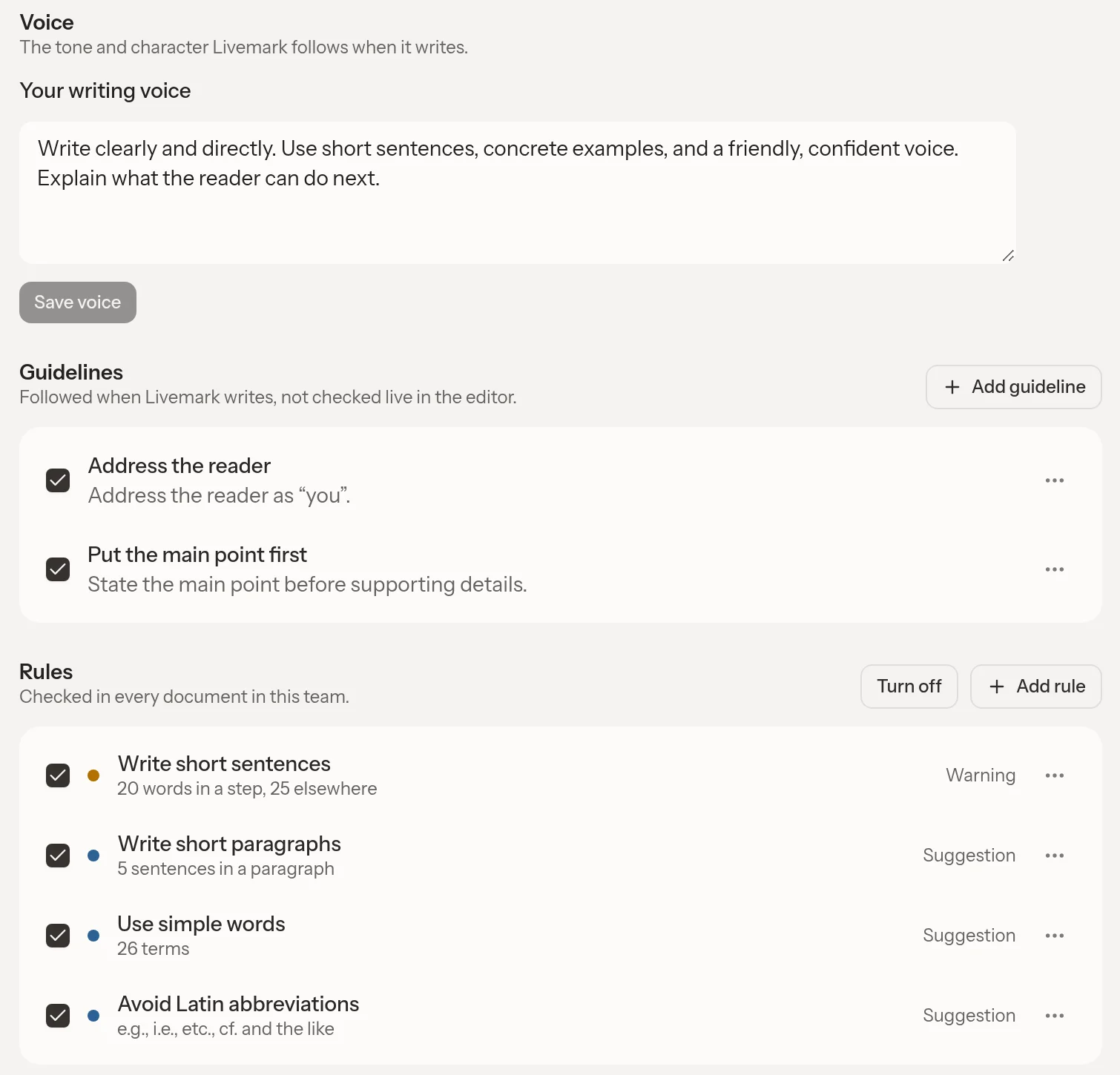
These controls appear only where writing style is enabled. Guidelines guide assistant writing; they are not live editor checks. Rules are separate document checks where supported.
Use Save voice after changing the writing voice. Other dialogs have their own save controls. You can disable a rule without deleting it.
The guide belongs to the team. Do not put private personal information in it. Document checks and the assistant use the guide where supported, but do not guarantee that every sentence follows it.
When the feature is disabled, its page and sidebar entry disappear, style routes are unavailable, and editors receive no guide for underlines. Stored guides remain for later re-enablement. Changing a team role does not override an installation-wide disablement.
Configure organization AI keys only where enabled
Organization-provided AI keys have a separate feature gate. Owners and admins can manage them when the organization has access. A team admin who is only an organization member cannot configure a key for all the organization's teams.
The form accepts Anthropic and OpenAI API keys. Choose a model offered in the form. A consumer chat subscription token cannot replace the requested API key.
The key applies to every team in the organization. In a single-team organization, controls appear in Team settings. In a multi-team organization, use Organization settings.
Livemark checks a new key before saving it. If validation fails, the existing key remains active. A rejected model change keeps the previous model. Follow the displayed error for invalid credentials, model access, provider rate limits, or provider availability.
Use the removal controls to stop using the organization's key. When this feature is disabled, Livemark uses its configured service credentials instead and retains stored organization keys. This behavior does not establish billing entitlement or a production rollout schedule.
Enable Vim only when offered
Vim keybindings default off until enabled for an account through rollout. They are not available to every account.
If Keybindings appears in Settings under Appearance, select Vim to save your preference. Documents then open in Normal mode where Vim applies. The preference follows your account, but Vim also requires a qualifying pointer environment.
Select standard keybindings in the same control to stop using Vim. If the rollout is disabled, the setting disappears and editors use standard behavior. Your saved preference remains.
Distinguish connector access from agent access
Outbound Connections have their own feature gate. Disabling them hides their card, blocks connection routes, and prevents remote tools from being offered, without deleting stored grants.
Inbound MCP is a separate authenticated service. Team membership and endpoint choice still matter. Neither a visible connector card nor a Style guide entry proves that another gated feature is available.