Chat controls
Steer an active reply, queue a separate request, stop a run, and recover waiting messages.
On this page
While the assistant replies, use Steer to correct the current work or Queue to send a separate request for the next turn.
These controls act on your conversation. They do not change who can see its transcript or undo shared document changes.
Send a normal message
When no reply is running, enter your message and press Enter or select Send. Use Shift+Enter to write another line without sending.
While a reply is running, Enter has a different meaning. It steers eligible messages into the active work. If you want a separate next turn, use the queue control instead.
Correct the current work
- While the assistant is replying, type a correction in the composer.
- Press Enter or select Steer.
- Check the waiting-message status until the assistant reads the correction.
The assistant reads a steering message after its current step. Steering does not interrupt a tool, so a change already underway may finish first.
When the message is read, it appears in the transcript where the assistant received it. A correction does not reverse earlier changes.
Steering is for text messages without images or a skill handle. Messages that cannot steer wait as a separate turn instead. If Steer is unavailable, use Queue or wait for the run to finish.
Queue a separate follow-up
- Type the next request while the current reply runs.
- Press Option+Enter on a Mac or Alt+Enter elsewhere.
- Alternatively, select Queue beside the composer.
The request waits until the current reply ends. A queued request does not correct the current step.
On a touch device, use the Queue button. Remove outdated requests from the waiting list before they run.
Stop a reply
Select Stop, or press Escape in the composer during a run. If a suggested message is showing, Escape first dismisses that suggestion.
The answer written so far remains and the reply is marked Stopped. Waiting messages pause instead of continuing automatically. A stop request may need to wait for the current operation to finish.
Stopping does not undo changes. Open any affected document and inspect its change cards. Use Suggestions or Versions to review or recover writing. The partial reply may not describe every change.
Recover waiting messages
The Waiting messages list distinguishes Steering, Queued, and Paused requests. A stop, failure, or a reply that ends on a question pauses waiting work so you can decide what still makes sense.
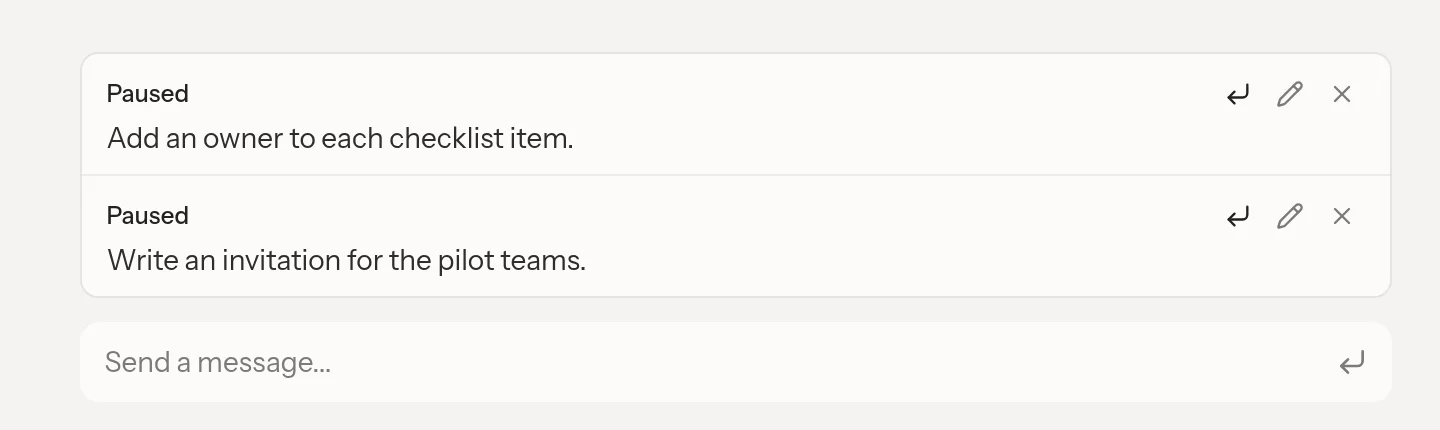
Use Edit to take a waiting message back into the composer. Correct it and send it again. Use Remove when it is no longer needed. If the assistant has already consumed it, the interface can report Already sent. In that case, send a new correction instead.
For a paused request, Send now starts it when nothing is running. During another run, the available action is Steer for eligible text or Send next for a separate turn. Answer any outstanding question before resuming requests that depend on that answer.
See Chat for choosing a conversation and Skills for requests that invoke a team procedure.